3D shed configurator for shed builders: buyers design it at home, you get the order
A 3D shed configurator lets a homeowner pick the size, roof style, doors, windows and colors and see the shed right away. The builder gets a finished design to quote instead of a vague “how much for a shed?”.
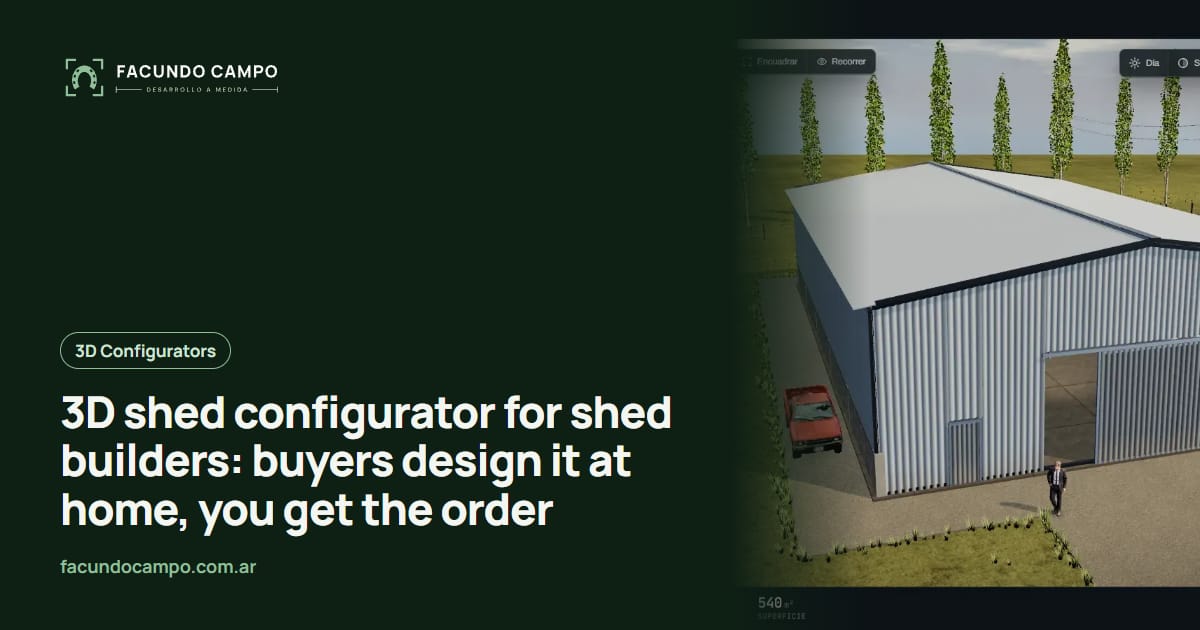
A 3D shed configurator is a tool on your website where homeowners choose the size, roof style, doors, windows and colors of their shed and watch it come together on screen. When they're happy with it, they send you the finished design, and you quote it without a round of twenty questions first.
If you build storage sheds, garden sheds or backyard buildings, this one's for you. I'll walk through how people actually shop for a shed, what belongs on the screen, and where you can try the idea today: Estructuras 3D, the demo I built to show builders what their own configurator could look like.
Your buyer shops at 10 p.m., not during business hours
Think about who's buying. It's a homeowner with a garage full of bikes and a mower sitting in the rain. They browse on their phone after the kids are in bed, usually with a spouse leaning over to weigh in on the color. They're not shed experts. They don't know what a lofted barn is or why a 10x12 might beat an 8x12 for them.
They have three questions: will it fit in my yard, how will it look next to my house, and what will it cost. The first two are visual. Photos of finished sheds don't answer them, because those sheds belong to somebody else.
Give that same person a way to build their own, and the message you get changes. It's no longer “what do you have?” It's “I want this one, side door, gray roof, two windows.”
What a good shed configurator lets people pick
Only what you actually build, in the combinations your shop allows:
- Size: width and length from your standard sizes, so the buyer sees how much of the yard it takes up.
- Roof style: gable, lofted barn, single slope or whatever styles you offer, with the overhang you use.
- Doors: single, double or roll-up, placed on the gable end or the side.
- Windows and vents: how many and where, without breaking your framing rules.
- Siding, trim and colors: wall, roof, trim and door colors, so it matches the house.
- Inside and extras: shelves, a loft, a workbench, a ramp, flooring upgrades.
Online buyers and lot buyers are the same people
A lot of shed companies sell through display lots and dealers, and that's not going away. People still like to walk into a shed, open the door and knock on the wall. The trick is that the shed on the lot is never exactly the one they want. It's the right size but the wrong color, or the door is on the wrong side.
A configurator on a tablet fixes that conversation. The dealer says “let's build yours” and shows the same shed with a different door and roof color right there. And when the buyer goes home to think it over, they can open the same design on their phone and send it in that night. I wrote more about this in a 3D configurator for dealer networks and 3D configurators for trade shows.
If each dealer has their own link, every order arrives tagged with who brought it in. No more arguing over whose lead it was.
Your shop rules are built in
Sheds look simple, but every builder has limits: the longest single-slope roof you'll frame, which double door won't fit on a narrow wall, how close two windows can be. If those rules aren't in the tool, buyers design something you can't build and your first reply is “sorry, we can't do that.”
So I build the configurator around your rules. Combinations that don't work simply aren't offered. What lands in your inbox is something your crew can build as-is, with size, roof, openings and colors already settled, so it can go straight to the shop floor. If you're wondering how that also weeds out tire-kickers, I covered it in how a 3D configurator qualifies leads.
A real project with the same flow: EQUIBOX
For EQUIBOX, a horse stall and barn manufacturer near Buenos Aires, Argentina, I built a 3D quote tool. Customers design their barn (size, model, walls and accessories), download a PDF spec sheet and request a quote on WhatsApp, and the company's sales team follows up. A shed is a different building, but the customer's path is the same: build it, see it, ask for a price.
You can also play with Estructuras 3D, my demo with metal buildings, carports, horse stalls and modular homes, to get a feel for it before you commit to anything.
See the EQUIBOX caseWorking with me from Argentina
I work on my own, remotely from Buenos Aires, Argentina, which is one to two hours ahead of the US East Coast and four to five ahead of California depending on the time of year. We talk on video calls, and you follow progress from a link you can open on your phone.
You don't need 3D drawings. Photos, dimensions and your shop rules are enough. Sizes can be in feet, and if you also sell in the UK or Australia, the Estructuras 3D blog has a piece on garden rooms and sheds in the UK and I have one for shed builders in the US.
Frequently asked questions
What is a 3D shed configurator?
It's a page on your website where buyers build their shed by picking size, roof style, doors, windows, siding and colors, and see it in 3D as they go. When they finish, they send you the full design so you can quote it.
Does it work for dealers and display lots?
Yes. The same configurator can run on a tablet at the lot, on each dealer's website or on yours, and every order comes in tagged with who generated it. That way your dealers sell with the same tool your website uses.
Can sizes be in feet?
Yes. Sizes, labels and the spec sheet can be in feet and inches, in meters, or both, depending on where you sell.
Do I need 3D models of my sheds?
No. Photos, dimensions and your shop rules are enough: which sizes you build, which roof styles you offer and where each door can go. I build the models from that.
If you build sheds and want buyers to show up with their design already done, message me on WhatsApp at +54 9 11 6193-3176 or email contacto@facundocampo.com.ar. I answer in English and Spanish, and I quote each project based on what your business needs. You can also see what else I do on [services](/en/servicios).