Carport configurator for dealers: roof, legs and sides settled before the first call
A carport configurator lets buyers choose roof style, width, length, leg height and side panels and see the result in 3D. The dealer gets a clean order to pass to the manufacturer, not a string of texts asking what size they need.
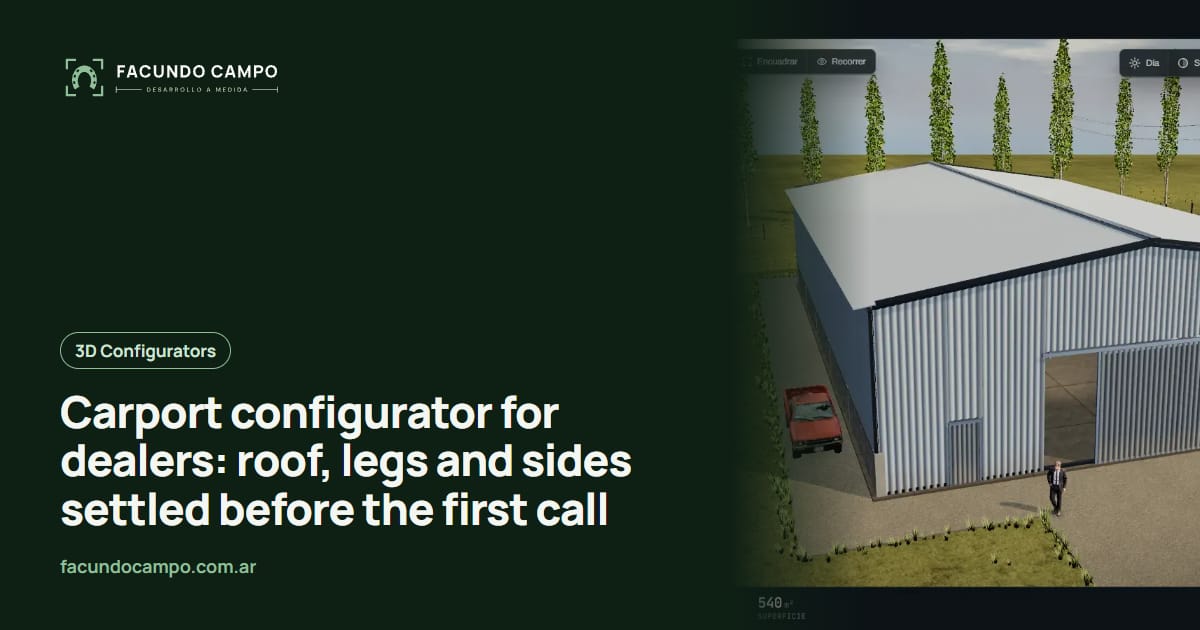
A carport configurator is a tool on your website where buyers choose the roof style, width, length, leg height and side panels for their carport and see it in 3D as they build it. By the time they reach out, the order is settled, and you can pass it to the manufacturer or quote it without a dozen texts back and forth.
This one is written for carport dealers and the manufacturers behind them. I'll skip the theory and go straight to how a carport sale actually goes, and to the pushback I usually hear when I show one of these.
The call every carport dealer knows
Someone calls about a carport for their truck. Fine, but which truck? Is there a boat or an RV too? Do they want the regular rounded roof or the vertical one because they get a lot of snow? Do they want one side closed in against the afternoon sun, or a gable end? Is it going on dirt or a slab?
Most buyers can't answer half of that on the spot because they've never thought about leg height or roof style. So you sketch, you text a photo of a similar unit, they ask their spouse, and two days later you're still on question four.
A configurator flips it. The buyer clicks through roof styles, bumps the legs up because the RV won't fit otherwise, adds a side panel on the west wall and sees the result. Then they send it. You're starting from a design, not a blank page.
What buyers pick on screen
Whatever your manufacturer builds, in the combinations they allow:
- Roof style: regular, A-frame or vertical, with a short note on what each one is for.
- Width and length: from your standard sizes, with a car, truck or RV shown inside for scale.
- Leg height: the option that decides what fits underneath.
- Sides and ends: open, partial panels, fully enclosed or a gable end, wall by wall.
- Doors and windows: roll-up doors, walk-in doors and windows if the unit is enclosed.
- Colors: roof, sides and trim.
Pushback I hear, and what I say
- “Our prices change too often.” The configurator doesn't have to show a price at all. Many dealers only want the design and quote it themselves.
- “Wind and snow ratings depend on the location.” True. The tool only offers combinations you know work, and the order comes in with the buyer's location so you can check before you quote. The engineering stays with you.
- “My buyers are older and call instead.” Then your rep opens it on their phone during the call and builds it with them. Both end up looking at the same picture.
- “I already have a price sheet and a form.” A form collects data, but the buyer can't see what they're asking for. I compared both in an online quote calculator without 3D.
When a carport turns into a garage
It happens all the time: someone starts with a simple carport, adds a side, then another, and realizes they want a closed garage for the truck and the tools. If your manufacturer builds both, the configurator follows that upgrade without making the buyer start over, and you just sold a bigger unit without pushing. If enclosed buildings are a big part of your line, see 3D configurators for metal building companies.
It also goes the other way. Someone shopping for a full building sees that a carport with one closed side does the job, and they come to you with a realistic idea instead of walking away.
Try it in Estructuras 3D
I built Estructuras 3D as a demo for manufacturers. You can build a carport, change the size, roof and sides, and see how it responds. It's what your buyers would see, with your models instead of mine. The Estructuras 3D blog has more on this in its carport 3D quoting tool article.
For a live tool with a real company, EQUIBOX, a horse stall manufacturer in Argentina, uses the same flow: the customer designs the barn, downloads a PDF spec sheet and asks for a quote on WhatsApp.
See Estructuras 3DWorking together
I work on my own, remotely from Buenos Aires, Argentina, one to three hours ahead of most US carport country depending on your state and the time of year. We meet on video calls and you follow progress from a link. The first thing I'll ask for is your build list: sizes, leg heights, roof styles and which combos need a different frame. That's enough to get a first version on your phone.
If you sell across the Southeast, I also wrote about a carport configurator for the Southeast US.
Frequently asked questions
Can buyers choose leg height?
Yes, within the heights your manufacturer builds. It's one of the most important choices because it decides whether a truck, a boat or an RV fits. The configurator shows the change right away and flags heights that need a different frame.
Does it have to show prices?
No. You can show a ballpark, a full price, or no price at all and just receive the design. The configurator works the same either way.
Can each of my sales reps or lots have their own link?
Yes. Each rep or location can get its own link, so every order comes in tagged with who brought it in. That helps with commissions and with knowing where your sales actually come from.
If you sell carports and want buyers to show up with roof, size and sides already picked, message me on WhatsApp at +54 9 11 6193-3176 or email contacto@facundocampo.com.ar. I answer in English and Spanish and quote each project on its own. More about my work on [services](/en/servicios).