Prefab and catalog homes: 3D configurator or 3D walkthrough?
If buyers design the house themselves, a 3D configurator fits; if they choose among fixed catalog models, they should be able to walk through them. What each one does, when each fits and when to combine them, with two demos to try.
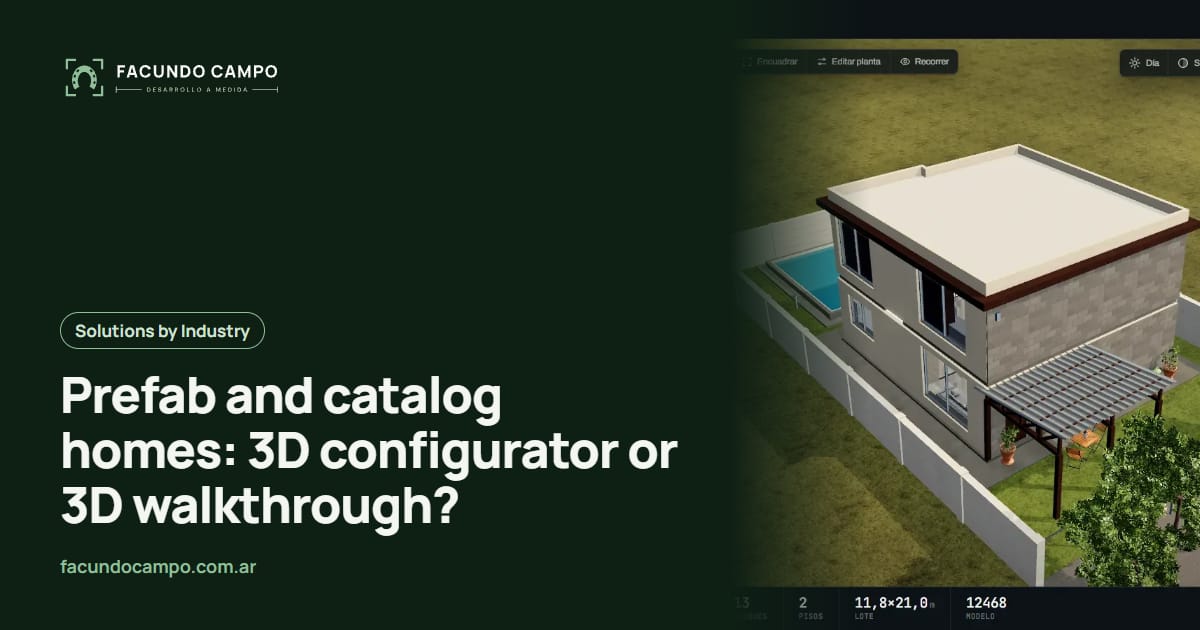
If you sell prefab, modular or catalog homes, there are two ways to show them in 3D: a configurator, where buyers build the house their way and watch it change, or a walkthrough, where buyers step into a defined model and walk through it. A configurator fits if your houses are built from modules and each buyer chooses; a walkthrough fits if you sell fixed models and the buyer question is how it feels inside.
I have a demo of each, so here are both with concrete examples.
What is a 3D home configurator?
It is a page where buyers build the house by adding blocks and options, and see it in 3D as they choose. In the Vivienda (house) tab of Estructuras 3D, my configurator demo, the house is built by adding bedrooms, bathrooms, kitchen, living-dining room and laundry, with an optional second floor and stairs, exposed brick, stone or wood cladding, porch, pool and fence.
The key point is that nothing is drawn by hand for each variant: the house is calculated from what the buyer picks. That is why one more bedroom is one more line, not a new render. I explain the idea in online 3D configurator.
What is a 3D walkthrough of a catalog home?
It is the finished, furnished model, walkable from the inside. In the demo of a 35 m² catalog house with a carport, the paper plan rises into the house, and the buyer walks through it with the scroll, room by room, in morning, afternoon and night light.
Here the buyer does not choose sizes: they choose a model. What they need is to understand it: whether the living room feels roomy, how the light comes in, how comfortable the kitchen is. It is the same idea I use in Recorrido 3D for off-plan apartments.
What changes between them?
| 3D configurator | 3D walkthrough | |
|---|---|---|
| What the buyer does | Builds the house: adds rooms, picks finishes. | Picks a model and walks through it. |
| Question it answers | What would the house I want look like? | What is it like to live in this model? |
| How it is seen | From outside, rotated and viewed from the front, side or above. | From inside, like walking, by day or by night. |
| How the lead arrives | With the full configuration, ready to quote. | With the chosen model and fewer doubts. |
| Which company | Modular homes built to taste. | Catalogs with fixed models. |
When does a configurator fit?
- Your homes are built from modules. If each buyer adds bedrooms, changes the kitchen or adds an upper floor, the configurator shows every combination without drawing them one by one.
- The quote depends on the choices. The lead arrives with the full configuration, no guessing.
- You sell at fairs or in meetings. Showing three variants in the same conversation helps close.
When does a walkthrough fit?
- You sell fixed models. If the catalog has ten models with few options, what sells is the buyer picturing themselves living there.
- Buyers compare by square meters. Two 35 m² houses can feel very different. Walking through them makes the difference clear.
- You sell remotely. If the buyer is far from the show home, or there is none, the walkthrough replaces it with a link.
What if I have both?
It happens a lot: standard models for buyers who want something proven, and custom versions for those who want changes. Then you can combine them: the walkthrough shows the base model from the inside and the configurator lets the buyer modify it and request a quote with everything defined. If you also sell sheds or warehouses, the same configurator covers them in the Galpón (shed) tab of Estructuras 3D.
For buildings the reasoning is similar but with a different focus; I cover it in 3D virtual tours for real estate agencies and builders.
Frequently asked questions
What is the difference between a 3D configurator and a 3D walkthrough?
In a configurator, the buyer builds the house: adds bedrooms, picks cladding, adds a porch, and sees it in 3D while choosing. In a walkthrough, the model is already defined and the buyer walks through it room by room to understand how it feels to live there.
Which one fits a catalog home company?
If the catalog has fixed models with few options, a walkthrough per model helps more, because the buyer question is what the house is like inside. If the company sells modular homes built to taste, a configurator fits better.
Can both be combined?
Yes. The configurator lets buyers define their house and the walkthrough shows how the base model feels. Many companies have both: standard models and custom versions.
Do they work on phones?
Yes. Both demos in this article work on a phone, in the browser, with nothing to install.
Tell me which homes you sell, whether they are fixed models or built to order, and how you show them today. I will tell you which option makes more sense for your catalog.