3D configurator for metal building companies: the buyer designs it, you get a complete order
A 3D configurator lets a metal building buyer pick the size, roof, doors and colors and see the result right away. The company gets an order with every detail decided, instead of a message that just says “how much for a building?”.
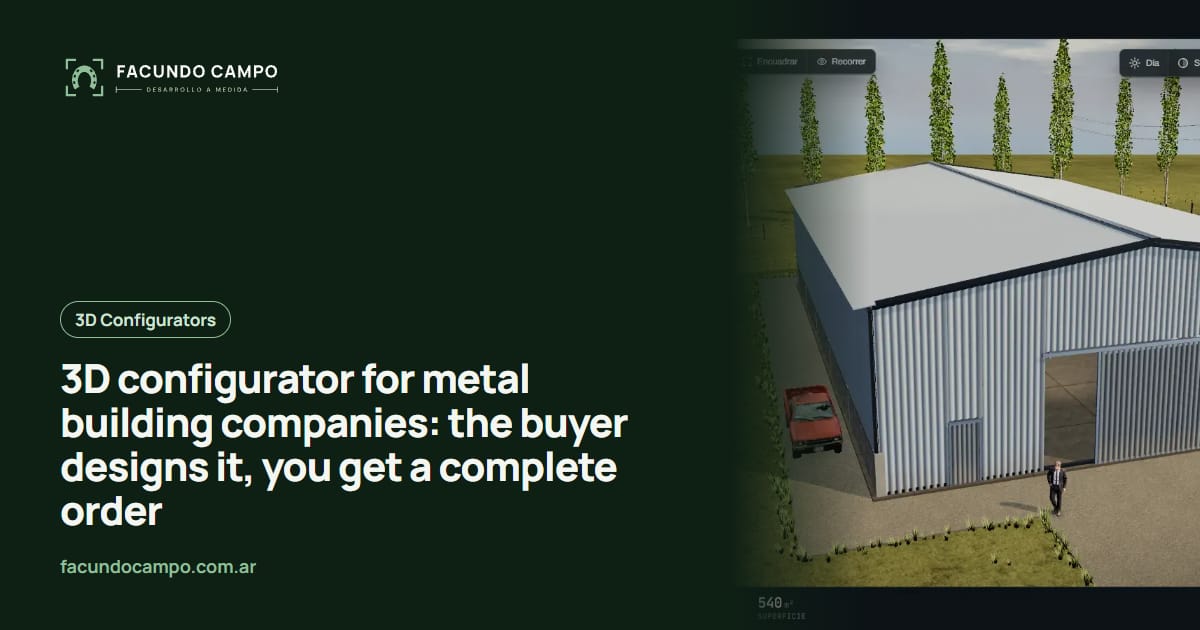
A 3D configurator for a metal building company is a tool on your website where the buyer picks the size, roof style, doors and colors, and sees their building on the screen right away. When they're done, they send you an order with every detail already decided, so you stop starting every conversation from zero.
Here's what changes day to day for a company that sells metal buildings, what your buyers should be able to choose, and how you can try it today in Estructuras 3D, the demo I built to show manufacturers what theirs could look like.
The “how much for a building?” problem
If you sell metal buildings, you know the message. Someone texts “hi, price on a building?” with no size, no idea what it's for, and no hint of whether they want a two-car garage or a hay barn. Before you can quote, you ask five or six questions, wait for the answers, and often sketch something so they understand what you're offering.
Two things get lost in that back-and-forth: your time and the buyer's interest. The person asking on a Saturday night wants a rough idea now, not on Tuesday.
A configurator flips the order. The buyer designs what they need first, then talks to you. By the time they reach out, they know what they want and you know what to quote.
What should buyers be able to choose?
Whatever drives the price and whatever decides whether the building works for them. For a typical metal building company:
- Size: width, length and eave height, within the ranges you actually build. If you work in bays, the configurator steps bay by bay.
- Roof: gable, single slope or curved, with the pitch you use.
- Doors: how many roll-up and walk doors, what size, and on which wall. That's what changes how the building gets used.
- Walls: fully enclosed, open sides or roof only, so carports and open-sided shelters are covered too.
- Colors and trim: roof and wall panels, so the buyer sees how it looks on their property.
- Add-ons: skylights, vents, gutters, insulation, or whatever you sell as an extra.
Why 3D instead of a long form
A long form with sizes and checkboxes also collects the data, but the buyer can't see what they're asking for. With a building, that matters. The difference between a 12 and a 16 foot sidewall, or a door on the gable end versus the side, is something you get by looking, not by reading.
In 3D the buyer spins the building around, looks inside, and tries combinations until it feels right. The order that lands in your inbox comes from someone who has already pictured the building on their land. I compared both approaches in more detail in 3D configurator vs PDF catalog.
Your building rules live inside it, too. If a certain width needs a different frame, or a door doesn't fit on a wall, the configurator simply won't offer it. Nobody asks you for something you don't build.
What lands on your desk
The goal is an order that's ready to quote. When the buyer finishes, they send their design by WhatsApp, text or email with the size, roof, doors, colors and add-ons, plus an image of the building exactly as they built it if you want one. You see the whole request and reply with a price instead of more questions.
You can also add a PDF spec sheet the buyer downloads to show their partner or whoever signs off, or send the request straight into the system where you track customers. What makes sense depends on how you sell today. I wrote more about that in how a 3D configurator qualifies leads.
What's already working: Equibox and Estructuras 3D
For EQUIBOX, a horse stall and barn manufacturer near Buenos Aires, Argentina, I built a 3D quote tool. The customer designs the barn (size, model, walls and accessories), downloads a PDF spec sheet and asks for a quote on WhatsApp, and the company follows up through its sales team. A metal building company needs the same flow, just with different parts.
To show exactly that, I built Estructuras 3D, a demo with metal buildings, carports, industrial buildings, horse stalls and modular homes. You can change the size, roof and doors and see how it responds before you decide anything.
See the Equibox caseBuildings, carports and shops in one configurator?
Yes, if you build them all. Plenty of companies sell all three, and buyers don't always know which one they need: they start looking for an enclosed building and realize a carport is enough, or the other way around. Having everything in one place lets them compare without leaving your site. If carports are your main line, take a look at what I wrote about a carport configurator for dealers.
For bigger commercial buildings, where there's always an engineering review or a site visit, the configurator doesn't replace that step. It just means you show up with the basics already settled. The Estructuras 3D blog has a guide to metal building quote tools with more examples from the industry.
How we'd work together
I work on my own, remotely from Buenos Aires, Argentina (UTC−3), with video calls and progress you can open from a link as I build it. We start with your models and your rules: which sizes you build, which you don't, and which combinations aren't allowed. From there I build a first version you can test on your phone and hand to your sales reps.
You don't need 3D drawings of anything. Photos, dimensions and whatever you explain to a buyer over the phone today are enough. I quote each project based on what your company needs, so the best first step is telling me how you sell now.
Frequently asked questions
What can buyers choose in a metal building configurator?
Whatever your company actually offers: width, length and height, roof style, number and position of doors, panel colors, and the add-ons you sell. Anything you don't build simply isn't there, so nobody designs something impossible.
Does the configurator show prices to the buyer?
That's your call. Some companies like to show a ballpark figure, others only want the finished design so they can quote it themselves. The configurator works either way.
Does it work on a phone?
Yes. Most building inquiries come from a phone, often from a farm or a job site, so the configurator is designed for a small screen first.
Can I try an example before ordering one?
Yes. In Estructuras 3D, my demo, you can design a metal building, a carport or an industrial building and see how it responds. Then we adapt it to your models, sizes and rules.
If you sell metal buildings and want buyers to show up with the order already designed, message me on WhatsApp at +54 9 11 6193-3176 or email contacto@facundocampo.com.ar. I answer in English and Spanish. You can also see what else I do on [services](/en/servicios).