Container home configurator: modules, openings and finishes so buyers know what they're getting
A container home configurator lets the buyer combine 20 and 40 ft modules, place doors and windows and choose insulation, cladding and a deck while watching it in 3D. The builder gets inquiries with a concrete project from buyers who already understand what each choice involves.
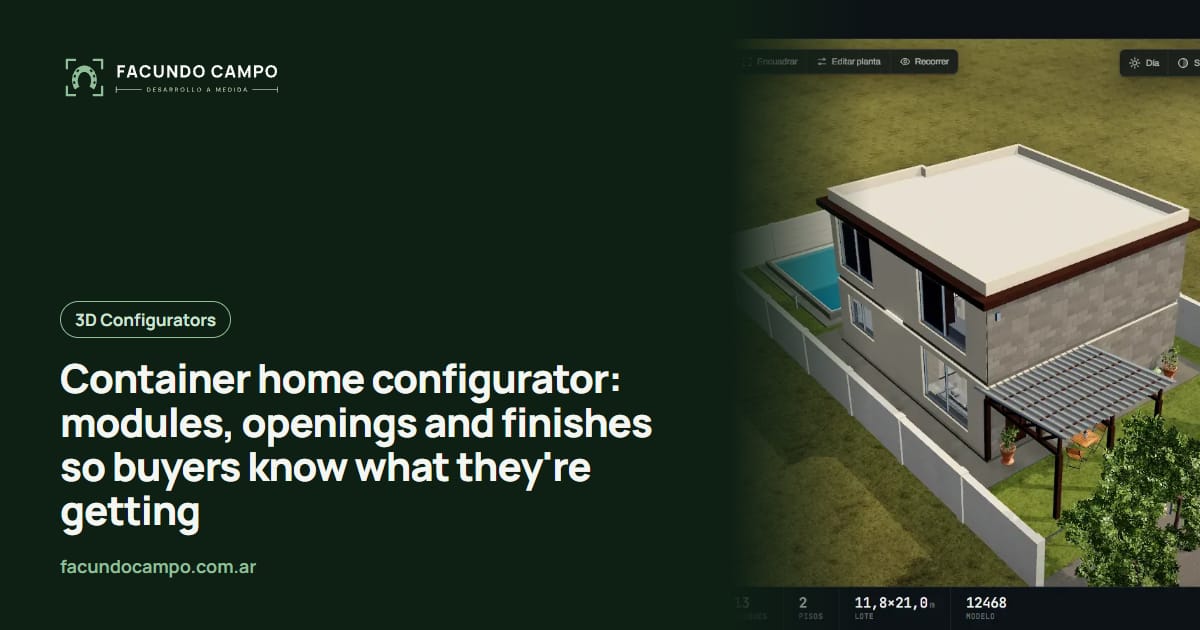
A container home configurator is a tool on your website where buyers combine modules (20 or 40 ft shipping containers, alone, joined or stacked), place doors and windows, and choose insulation, cladding, roof and deck. They watch the project in 3D as they build it and reach out with something concrete.
In this market the configurator has one extra job it doesn't have elsewhere: setting expectations. Here's why, and how.
Buyers show up with a Pinterest board
Container homes and offices get a lot of attention. The typical buyer has seen stunning photos online, with floor-to-ceiling glass, cantilevers and decks over a lake, and messages you thinking a container is a nearly finished house you just drop on the lot.
You know it isn't. Openings have to be cut, cuts need reinforcing, it has to be insulated properly so it isn't an oven in summer and a freezer in winter, the inside needs lining, wiring and plumbing have to be sorted, and there's a foundation to think about. Explaining all of that on every inquiry takes time, and sometimes the buyer hears it as you padding the quote.
In a configurator, each of those things shows up as a visible choice. The buyer sees for themselves that a big window is a cut in the steel wall, and that insulation is part of the house, not an add-on.
What the buyer picks, step by step
An order that follows how someone thinks when they've never built with containers:
- Use: full-time home, weekend place, office, shop, studio or a rental cabin.
- Modules: how many containers, which length, and how they connect: a single unit, two side by side for a wider room, or one on top of another.
- Openings: where the doors and windows go, how big they are, and whether a whole side opens up with sliding glass.
- Interior: a basic layout (bedroom, bathroom, kitchen, living area) based on the modules chosen.
- Finishes: insulation, interior lining, exterior color or wood cladding, roof type.
- Outside: deck, stairs, pergola or green roof, if you offer them.
Your container rules are built in
A container has limits buyers don't know about: how much of a side wall you can cut without reinforcing, what happens when you join two modules, where the bathroom should go to keep the drains simple. If the configurator lets people do anything, you get beautiful projects that can't be built.
So your company's rules live inside the tool. If a big window needs a reinforcing frame, it shows up as part of the choice; if you don't build a certain combination, it isn't offered. Buyers still have plenty of freedom, just within what really gets built. I wrote more about setting those limits in mistakes when buying a 3D configurator.
Container, modular or stick-built: buyers compare
A lot of buyers go back and forth between a container home, a modular home and a regular build. If your company does more than one of those, the configurator can show them side by side and let buyers compare sizes and layouts with their own eyes. If you only do containers, it still helps buyers see what sets you apart instead of comparing you on price alone.
For the other side of that question, see modular home configurator. The Estructuras 3D blog also has a post on the container and modular unit 3D quoting tool, with examples of site offices and job-site units.
What's already working
I haven't built a container configurator for a client yet. What is live is Estructuras 3D, my demo for metal buildings, carports, horse stalls and modular homes, where you can see a configurator change sizes, roof and openings on your phone. And for EQUIBOX, a horse stall and barn manufacturer near Buenos Aires, I built their 3D quote tool: customers design the barn with size, model, walls and accessories, download a PDF spec sheet and request a quote on WhatsApp.
See the Equibox projectWhat you receive and how you use it
The inquiry includes the use, the modules and how they connect, the openings, finishes and extras, plus an image of the project. That's enough to put a quote together without a round of questions, and to quickly tell apart the contractor who needs a site office next month from the couple dreaming of a weekend cabin a year from now. You help both, just not the same way.
If the inquiry can also be downloaded as a PDF spec sheet, the buyer can take it to their architect or whoever has to sign off; I covered that in automatic PDF quotes.
How we'd work
I work on my own and remotely from Buenos Aires (UTC−3), with video calls and progress you can check by link. We start with the modules you use, the combinations you build, your finishes and your rules for cuts and reinforcement. Photos of finished projects and your dimensions are enough. I quote each project based on what you need.
Frequently asked questions
Can buyers stack or join containers in the configurator?
Yes, within your company's rules. The buyer adds modules side by side or on top, and the tool only offers the connections you actually build. If a certain stack needs extra reinforcement, that can show up as part of the choice.
Does it work for site offices and pop-up shops, not just homes?
Yes. It can start with one simple question (home, office, shop, storage) and only show the fit-out and finishes that make sense for that use.
What about permits and zoning?
Those depend on the town and the lot, so the configurator doesn't settle them. The honest move is to say so right in the tool and suggest checking with a local professional before going further.
If you build container homes, offices or shops and want buyers to show up understanding what they're buying, message me on WhatsApp at +54 9 11 6193-3176 or email contacto@facundocampo.com.ar. I answer in English and Spanish. See my [services page](/en/servicios) too.